


Subscribe to GDeluxe
Yahoo Advertising
-
What would you like to increase in iPhone 6 (iPhone Air)?
DOWNGRADE 5.0.1 to 5.0 IPHONE 4, IPAD with iFAITH 1.4
Advertisements
Posted date:
December 6, 2011 |
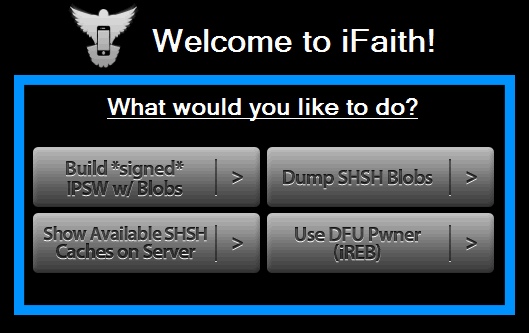
iFath is an SHSH and APticket dumping application for Windows.
Downgrade From iOS 5.0.1 to iOS 5 Thanks to iFaith 1.4 (iOS 5.0 APticket Required) From GDeluxe.
If you’re on iOS 5.0.1 already, then you’re out of luck. Fortunately, those of us still on iOS 5.0 can save not only our SHSH blobs but also our APtickets, which are used in Apple’s new firmware verification process.
What does that mean? It means that if you’re on iOS 5.0 right now, and you mess your iDevice up and need to restore (updates to iOS 5.0.1) then you can downgrade back to iOS 5.0 granted you used iFaith to save your APticket before you restored.
Just to emphasize, if you are on iOS 5.0.1 already, you CANNOT downgrade to iOS 5.0. This is for people who have saved their APtickets on iOS 5.0 as they will be the only ones who can downgrade back from iOS 5.0.1 to iOS 5.0.
An APticket is a piece of information. It’s like a screenshot in a sense. When you are using Apple’s iOS 5.0 firmware, your device has an APticket saved for iOS 5.0. When you update to iOS 5.0.1, your APticket changes to an iOS 5.0.1 APticket. This is how Apple keeps you from downgrading. By using iFaith, you can save not only your SHSH blobs, but also your current (iOS 5.0) APticket. That means that you can use the APticket that you had for iOS 5.0 to downgrade back to iOS 5.0 from iOS 5.0.1 since your iOS 5.0 APticket is still valid. If you don’t save your APticket when you are on iOS 5.0, then your new APticket is the one that is given to you by iOS 5.0.1 which means that you don’t have an APticket for iOS 5.0. Since you won’t have an APticket for iOS 5.0 and you only have one for iOS 5.0.1, you can’t downgrade back to iOS 5.0; iOS 5.0.1 is the lowest you will be able to go.
Hopefully I clarified that enough for you all, honestly I barely even knew what iFaith did and I needed to research it a bit myself so bear with me.
Currently, iFaith only supports Windows, as iH8sn0w is a Windows user himself. He is also the famed developer behind Sn0wbreeze which is also a Windows-only jailbreak tool. At this point in time, we don’t know if a Mac version will be released, but all Macs can run Windows, so there’s no issue with compatibility here.
iFaith 1.4 for Windows can be downloaded for free here.
iFaith release notes:
PHP Code:
iFaith v1.4 Release notes:
======================================
* Now dumps iOS 4.4.x (Apple TV 2)/5.0.x apticket + SHSH blobs!
* Dumping is MUCH faster.
* Full Windows XP support.
* Major code improvements.
* Bug fixes.
**************************************
** DOES NOT SUPPORT A5 DEVICES YET! **
**************************************
======================================
Now available at: http://iH8sn0w.com
======================================
// iH8sn0w
“You gotta believe in the voltage that lives inside us,
So lets buckle up and break our walls down. (Whooooaahhoo)”
- @Skrillex
GDeluxe recommend dumping your SHSH and APtickets if you’re on iOS 5.0. It will make downgrading back to iOS 5.0 possible for you in the future (in fact, right now). Will you be downloading and using iFaith 1.4? Share in the comments below!
Sources: iH8sn0w
We Recommend:
Related Posts:
Downgrade, iPHONE 4, Jailbreak iPad 2, JAILBREAK iPHONE 5
Recent Posts:
- iPhone 6: Smaller Unibody With 4.5-inch Display!
- iPhone 6 Status
- Turn On Unlock Sound iOS 7 On iPhone. You Can Do It Now.
- Does iPad Air 2 Have Touch ID?
- Bad iPhone Battery Life with Facebook App? How To Fix!
- When will we see iOS 8 on iPhone 6 (iPhone Air)?
- iPhone 6 Price Without Contract In Usa, Canada.
- WWDC 2014. What's New? Event Time Announcer
- iOS 8 Beta 1 Release Date - June 02, 2014
- WHAT WOULD YOU LIKE TO INCREASE IN IPHONE 6?
Author on G+:
