


Subscribe to GDeluxe
Yahoo Advertising
-
What would you like to increase in iPhone 6 (iPhone Air)?
iPHONE THEME - WINDOWS PHONE 7 LOCKSCREEN
Advertisements
Posted date:
April 27, 2011 |
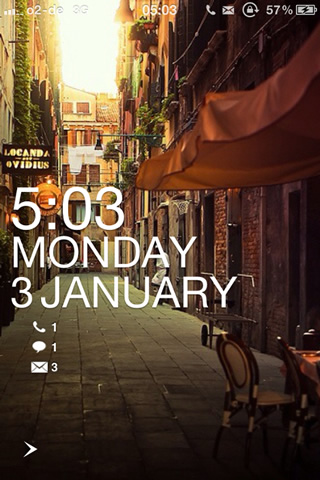
Requirements:
* Winterboard
* LockInfo
* Lockscreen Clock Hide
Optional:
* Move to Unlock
Installation:
1. Install Winterboard
2. Install LockInfo
3. Install Lockscreen Clock Hide
4. Transfer the WP7 Lockscreen Theme to Winterboard Theme Folder
5. BACKUP your Springboard.String (/System/library/CoreServices/Springboard.app/English.lproj) and edit AWAY_LOCK_LABEL “Slide to Unlock” to “”
6. Activate LockInfo and Lockscreen Clock Hide
7. Select the Theme in Winterboard - Respring..
8. Done
LINK
We Recommend:
Related Posts:
iPHONE LOCKSCREEN, iPHONE THEME, WINDOWS PHONE 7
Recent Posts:
- iOS 7.1.1 Download Links For iPhone, iPad, iPod touch. [Soon]
- iPhone 6 4.7-inch Display, Camera, Touch ID ... new price
- iPhone 6: Smaller Unibody With 4.5-inch Display!
- iPhone 6 Status
- Turn On Unlock Sound iOS 7 On iPhone. You Can Do It Now.
- Does iPad Air 2 Have Touch ID?
- Bad iPhone Battery Life with Facebook App? How To Fix!
- When will we see iOS 8 on iPhone 6 (iPhone Air)?
- iPhone 6 Price Without Contract In Usa, Canada.
- WWDC 2014. What's New? Event Time Announcer
Author on G+:
