![[WINDOWS] JAILBREAK IPHONE 4S 5.0.1 UNTETHERED](wp-content/uploads/2012/01/iPhone-4S-jailbreak-untethered-ios51-150x150.jpg)


-
Recent Posts
New Apple Products Coming Soon. This Fall. (via Tim Cook)
 April 24, 2013
For the last six months, Apple has been hearing one criticism more consistently...
iOS 7 Features, Download, Release Date, Rumors, Specs
April 23, 2013
iOS 7 Features, Download, Release Date, Rumors, Specs iOS 7 comes with over...
Facebook Chat Heads: How To Enable FC Chat Heads On iPhone,...
April 23, 2013
Facebook Chat Heads: How To Enable FC Chat Heads On iPhone, iPad, Ipod Touch. Just...
Download Content "Later" on iOS 6.1 and iTunes 11
April 23, 2013
Apple recently added a slew of new download options for customers of its iTunes...
Blacklist For iPhone - How To Enable Blacklist On iPhone
April 22, 2013
Blacklist For iPhone - How To Enable Blacklist On iPhone: Blacklist is the true...
Abstergo Cydia Tweak That Improves iOS Notification...
April 22, 2013
Abstergo Cydia Tweak That Improves iOS Notification Management. You can clear...

IF YOU WANT JAILBREAK 5.1 UNTETHERED iPHONE 4, 3GS, IPAD

MAKE THIS - IF YOU WANT JAILBREAK 5.1 UNTETHERED iPHONE 4, 3GS, IPAD…..
The developer of the TinyUmbrella has explained why to save SHSH blobs in details here. Whenever a new firmware comes out Apple stops signing the older firmware which cannot be restored then. But if you’ve SHSH blobs for a firmware, you can always restore back to that one no matter how many firmwares are released after that. Apple will stop signing the current iOS 5.0.1 as soon as the new iOS firmware is released, so it’s best time to save SHSH blobs for iOS 5.0.1 using the guide below.

I. How to Save SHSH Blobs for iOS 5.0.1
Step 1
Download TinyUmbrella ( Mac OS X ) ( Windows )
Download iTunes 10.5
Step 2
Run the TinyUmbrella that you downloaded in the Step 1.
(Mac users: Copy the app to your desktop or you’ll get repeating password prompts if you ran the app from within the DMG)
Now Connect your iPad, iPad 2,iPhone 4, iPhone 3Gs, iPod Touch 3G to your computer.

Step 3
TinyUmbrella will auto detect your connected device and its ECID.
Now Simply Hit the Save My SHSH button and TinyUmbrella will grab SHSH blobs for your device.
This will also generate a ticket to save SHSH blobs to Saurik’s server.
Step 4
All Done! You have secured your future jailbreak by saving SHSH blobs for iOS 4.3.3 using TinyUmbrella.
You can find the saved SHSH file under:
MAC: /Users//.shsh (ex: /Users/gdeluxe/.shsh)
WINDOWS XP: :\Documents and Settings\\.shsh
(ex: C:\Documents and Settings\gdeluxe\.shsh)
WINDOWS 7::\Users\\.shsh (ex: C:\Users\semaphore\.shsh)
Step 5
Open Redsn0w and go to Extras –> SHSH blobs –> Stitch

Step 6
Select official iOS 5.0.1 file and select new certification (step 3)
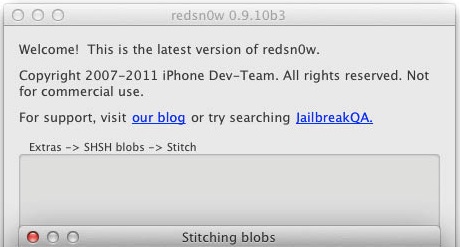
Step 6
Done
P.S. If you have Windows 7 and read this message ->”The blobs could not be verified”:
1) Close Redsn0w.
2) Open folder C:\Program Files (x86)\Common Files\Apple\Apple Application Support.
3) Copy all files.
4) Paste all files to C:\Users\[имя пользователя]\AppData\Roaming\redsn0w.
Advertisements
